Listener Gary just emailed me to let me know that he was browsing Amazon and ran across a listing on their French site that looks to be an “iLife ’10 for Dummies” book. The description doesn’t really reveal anything about any new features, but the entry does have a September 23rd, 2010 release. Listings like this do “leak” from time to time and they may or may not be confirmation of a software update. It’s seems logical to assume Apple has been working on an update to the iLife suite. So will we see a new iLife this Fall?
Update: Added HD (720p) version below for comparison.
Above is a sample movie I created 100% on the new iPhone 4. I used the iPhone 4’s built in front and rear facing cameras to capture stills and video. I used Apple’s new iMovie for iPhone App to edit and assemble the clips and add the transitions, titles, and audio. Finally the video was exported to the Camera Roll and uploaded directly to YouTube via the device. The whole project took about 2 hours or so to complete and was actually quite simple to put together. As you can see the final results are pretty good, but there is room for improvement. First. I don’t have steady hands and I think a tripod or something to stabilize the phone as I shot the video would have been a great help. As for the audio, I used the built-in “theme” track. In the app there was no indication of the length of the track. When enabled it simply created a green “tack line” under my video timeline and the line extended the full length of my video project. I naturally assumed it was long enough or would loop to cover my whole project. When previewing in edit mode in the app it even played the audio throughout the project. It was only after export that I discovered the track simply faded out at the end, around a minute or so in. There is no option to loop the track and you can only have one such “background” track per project. You can however also include the recorded audio from each clip over the background audio if you choose and it will even auto-duck the background track. Finally, the video exported to the Camera Roll on the iPhone is output at 720p (1280 x 720). Unfortunately, uploading to YouTube directly from the iPhone only yields a maximum resolution of 568 x 320. I assume this is why the YouTube above maxes out at 360p. Even so I think that all of this can be done on a phone. Just so you can get a comparison, I do plan to upload a 720p version polished up in iMovie on my Mac so you can see what the iPhone is fully capable of. Stay tuned.
Here is the 720p version as promised. It is still exactly the same version produced and exported entirely on the iPhone. The only change is a new music track I added in iMovie on the Mac since the iPhone version couldn’t be looped.
Today a bunch of reports started to surface raising concerns that the iPhone 4’s new antenna design may be affecting cellular reception when it’s held in your hand. If true, it would be a major flaw and shocking that Apple would let something like that slip through. I’m picking up my new iPhone 4 in the morning and the news of this issue was putting a major damper on my pre-iPhone 4 excitement. I continued to read report after report and kept hoping to find more info about the cause of the issue. I also hoped to find a possible solution or work around. Luckily I found a piece on MacRumors.com that indicated the issue might not be new and it also might not be as serious as is currently being reported. Check out the video.
So it looks like the “issue” can be replicated on not only the new iPhone 4, but also on a 3G or 3GS iPhone. What remains now is to determine if this is simply a visual issue or if reception is truly being affected. Early reports seem to indicate that calls continue even with the diminished bars on the display which is a good sign. Either way I’m sure these reports will grab Apple’s attention and shed some light on what seem to be a long standing issue. Hopefully we’ll also see an fix issued soon.
At least for some. Starting Sunday many of you emailed me to let me know that Apple had started sending iPhone shipping notices for your pre-ordered iPhone 4’s. One thing I noticed in several of the emails was that the arrival date was noted as June 23rd, a day before the officially announced June 24th date. I figured it was the scenario we had seen in the past where the shipments start, but Apple requests the shipper hold the items until the actual launch date. Well now it’s looking like this time will be different.
Checkout the email being sent out this morning to pre-order customers:
Dear Apple Store Customer,
You recently received a Shipment Notification email from Apple advising you that your iPhone has shipped.
This email is to confirm that your delivery will occur on June 23rd. Although Apple and FedEx tracking information may currently indicate a later date, you can check the FedEx website the morning of the June 23rd to track your package to your doorstep.
In the event that you will not be available to accept delivery on June 23rd, it may be more convenient to use our pre-sign delivery option by visiting our Order Status website at http://www.apple.com/orderstatus.
Sincerely,
The Apple Store Team
So I guess that date was correct. What is not clear at this point is why Apple bumped up the date. A logical guess is that there are concerns over the volume of activations and they may be trying to spread the load between at home deliveries and in-store pick-up which will still take place on the 24th.
I’m glad that many of you will be getting your new iPhones a day early, but I do have to mention this will likely create some outcry from those who weren’t able to get their pre-orders through Apple and AT&T’s systems. Either way I expect Thursday and (now) Wednesday will be both exciting and frustrating for Apple fans.
The folks over at MacStories noticed their 2008 Macbook Pro getting a bit drowsy when they let their iPad get too close (see video below). What seems to be happening is placing the iPad over the lower right hand rest area of the Macbook Pro makes it to go to sleep. Repeating the procedure then wakes it up. Odd indeed, but explainable.
It’s seems to be a magnetic switch that activating to put the Macbook Pro to sleep when the lid is closed. If you take a paper clip and place it about 1/3 of the way down the right edge of the Macbook Pro screen it will stick to it. There are also a bunch of magnets along the top edge of the screen, but those appear to be there just to hold the Macbook Pro lid shut when it’s closed.
The sleep switch also seems to be magnetic and about the same distance down along the right edge of the Macbook Pro top case just behind the right speaker grill. It does appear to be a little further in, more toward the keyboard so I assume it gets pulled out to the edge when you close the lid activating the switch. Now the key to triggering it with the iPad is to place the back of the iPad, specifically the area just under the iPad speaker holes, over that section of the Macbook Pro. Viola! The Macbook Pro should go to sleep. I believe it’s the magnets in the iPad speakers that act like the magnets in the Macbook Pro lid and cause the Macbook Pro to think you shut just the lid effectively putting it to sleep. No mystery, no magical forces, just science.
Maccast listener Connor really deserves the credit for discovering this quirk. He emailed me about 3 weeks ago to say he was seeing this behaviour when he got an iPhone 3GS near that part of a 15″ Macbook Pro. At the time I couldn’t repeat the behaviour, but I was able to confirm this with my 15″ Macbook Pro and my 32GB Wi-Fi iPad.
Electronista has a post reporting that Adobe has a new Flash preview release dubbed “Gala” (10.1.81.3). With the arrival of “Gala” Adobe has added support for H.264 video hardware decoding on Macs with OS X 10.6.3 and NVIDIA GeForce 9400M, GeForce 320M or GeForce GT 330M graphics chips. Since I own a 15″ unibody Macbook Pro with an NVIDIA 9400M I decided to see how much of a performance difference the new Flash build might offer. For my testing I didn’t use any traditional benchmarking suite, so please take the results accordingly. I do think my tests should represent a “real world” type scenario. Basically, I played back a 720p HD video from YouTube and monitored the resulting Flash Player Plug-in CPU load in Activity Monitor. I found that when running the test on the latest “non-Gala” version of Flash the CPU load on my 2.4 GHz Intel Core 2 Duo Macbook Pro with 4GB of RAM went up to about 90% CPU utilization. Also the fans on my Macbook kicked in about halfway through the video which runs about 4:30.
When I ran the same video after installing the “Gala” build of Flash I saw a significant drop in CPU usage. The CPU load hovered between 30 and 40%, roughly about a 50 to 60% decrease in load. I also didn’t have my fans kick in.
With “Gala”, you can tell when the Flash hardware decoding has kicked in by the appearance of a small white square in the corner of the video. Adobe says that in addition to improved playback of H.264 video the hardware enhanced version of Flash should also result in improved battery life. Might be welcome benefit for long Hulu video watching sessions when away from a power outlet.
To be fair I also switch YouTube over to the HTML 5 beta and tested the same video at 720p. Again in my very non-scientific benchmark test I noted that Safari’s CPU load went up to about 20% with the video playing.
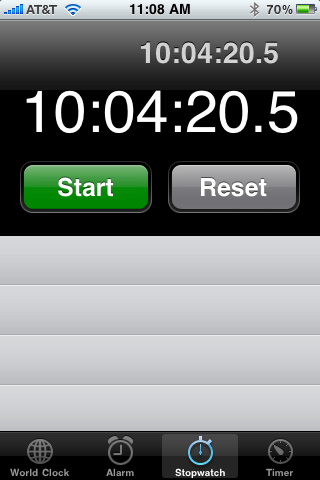
A few days ago I sent out a tweet stating I was having trouble outlasting my new iPad’s battery. It was about 2:40 AM and I had been using the device heavily since about 10:30 AM the day before. What I hadn’t done is keep track of exactly how much time the iPad was powered on and actually in use. Many of you tweeted to ask me to post exactly how much powered up usage time I got with my new Wi-Fi wonder slate. Well here it is:
10:04:20.5. I would say that is meeting Apple’s stated tech specs. I did have Wi-Fi on the whole time and I did a variety of tasks from reading books and watching video to surfing the web and reading RSS feeds. As a bonus I also wrote this blog post using the WordPress app for iPad. Typing on the on-screen keyboard is amazingly good (if not a little messy). So, in addition to the amazing battery life I’m finding that the iPad is also a very capable alternative to my Macbook Pro when I want a more agile and lighter weight alternative.
And oh, in case your wondering about charging time. Using the included 10W USB Power Adapter I was able to go from 0 to 100% charge in approximately 4 hours.
Just on the heels of Macworld 2010 the folks at Nuance Communications, Inc. and MacSpeech have announced that Nuance will acquire MacSpeech. Two years ago at Macworld Expo MacSpeech announced that they had licensed the underlying dictation technology from Nuance Communications and would be integrating it into their products. Since then they have continued to improve and extend their range of dictation products for the Mac. This year at Macworld Expo they announced MacSpeech Scribe. MacSpeech Scribe now allows you to pre-record your dictation into a digital recorder and later pass it through the MacSpeech software to perform your text to speech conversion; a feature long requested by users of MacSpeech Dictate. Many of the new products and innovations in the MacSpeech line came from their partnership with Nuance Communications, so this acquisition seems like a logical next step.
“MacSpeech responded to the growing demand for a native Macintosh, high-quality speech recognition solution with MacSpeech Dictate integrated with the Dragon speech recognition engine,” said Andrew Taylor, president of MacSpeech. “We are excited to become part of the Nuance team and accelerate our ability to deliver great speech solutions to the Mac community.”
The good news is that it sounds like Nuance plans to use the acquisition to increase the research and development of products in their line that are specifically designed and developed for the Mac, iPhone, iPod ( and hopefully iPad) lines. The people at MacSpeech have long been big supporters of the Mac community and I wish them the best of luck moving forward.
A short unboxing video of Apple’s new Magic Mouse. I also, share some of my early thoughts and impressions on Apple’s latest attempt at this input device.
Join us for live Maccast Skype chat starting right now. We’ll have the conversation going now until the end of Apple’s live “Notebook” event which starts today (10/14) at 10:00 AM PT. We are using Skype this time because iChat rooms have a 35 person limit. If you have Skype already installed, use the link below to join If you don’t have Skype you can download it and use it for free at Skype.com. The Skype room limit is 150, so it will still be first come first served. See you there.





 Just on the heels of

